
Overview
The Call from SMS custom tool enables your AI assistant to initiate a phone call to a user directly from an SMS conversation — while carrying over the full conversation context. This means when the voice assistant calls the user, it already knows what was discussed via text.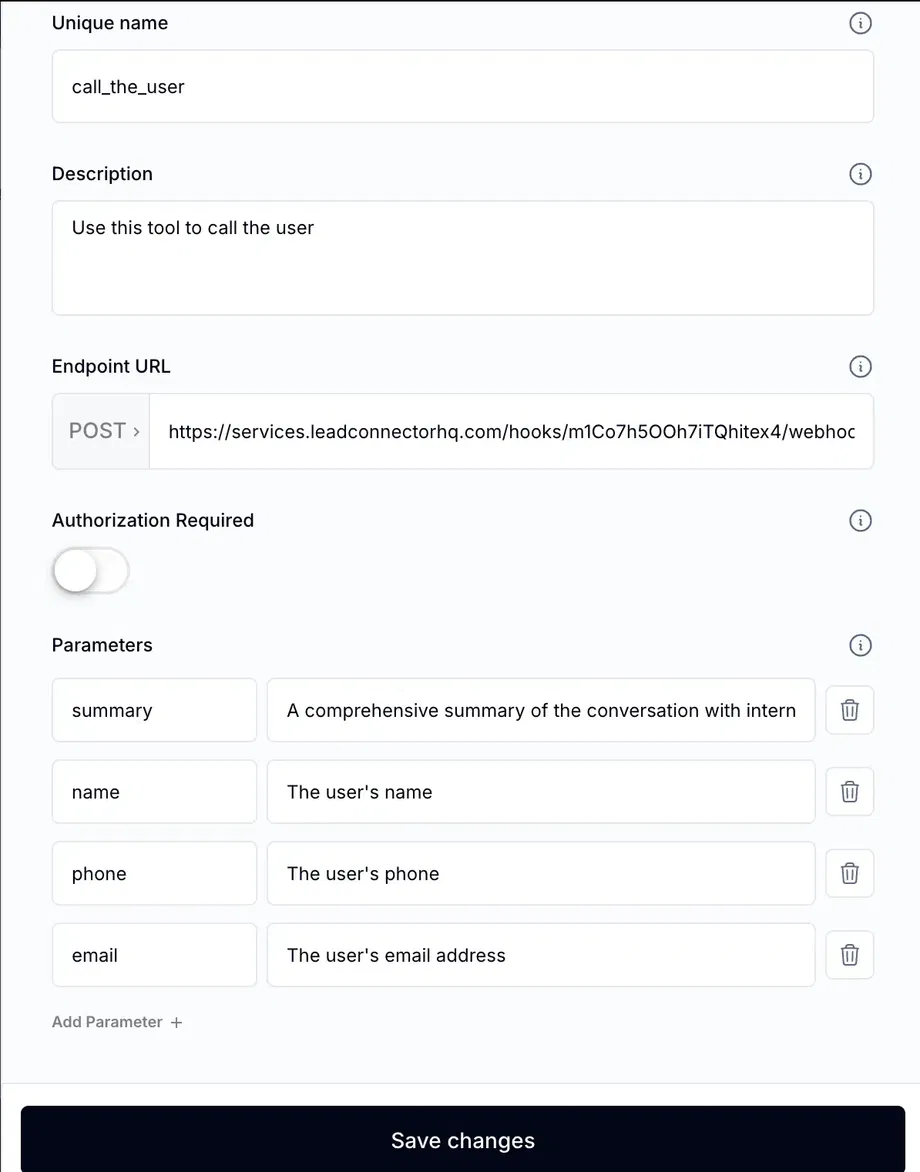
Why Use This?
Some conversations are better handled over the phone — complex scheduling, sensitive information, or when a user explicitly requests a call. This tool bridges the gap between chat and voice seamlessly. Key benefits:- Context preservation — The voice AI knows what was discussed in SMS
- Seamless transition — No need for the user to repeat themselves
- User-initiated — The AI calls when the user is ready
How It Works
When the AI determines a phone call would be more effective (or the user requests one), it triggers this tool. The tool uses the Assistable API to initiate an outbound call to the contact, passing along the conversation context so the voice assistant can pick up where the SMS left off.1
Create the Custom Tool
Navigate to Custom Tools in your assistant settings and create a new tool named
call_user_from_sms.2
Configure the Description
Set the description to: “Call this tool when the user wants to switch from SMS to a phone call. The voice assistant will have full context of the SMS conversation.”
3
Set Up the API Endpoint
Use the Assistable API to trigger an outbound call. The endpoint should pass the
contact_id and conversation summary to the voice assistant.4
Update Your Prompt
Add instructions telling the AI when it’s appropriate to offer a phone call (e.g., complex topics, user frustration, or explicit requests).
This tool requires a Voice AI setup with an active phone number configured for outbound calling.
Related Pages
Send SMS During Calls
The reverse — send texts during voice calls
Send Summary
Send conversation summaries to clients
Voice AI Setup
Configure voice AI assistants
Custom Tools Overview
Learn the fundamentals of custom tools