
Overview
The Screenshot Website custom tool allows your AI assistant to capture a visual screenshot of any webpage. This is useful for visual verification, design reviews, or providing users with a preview of a website.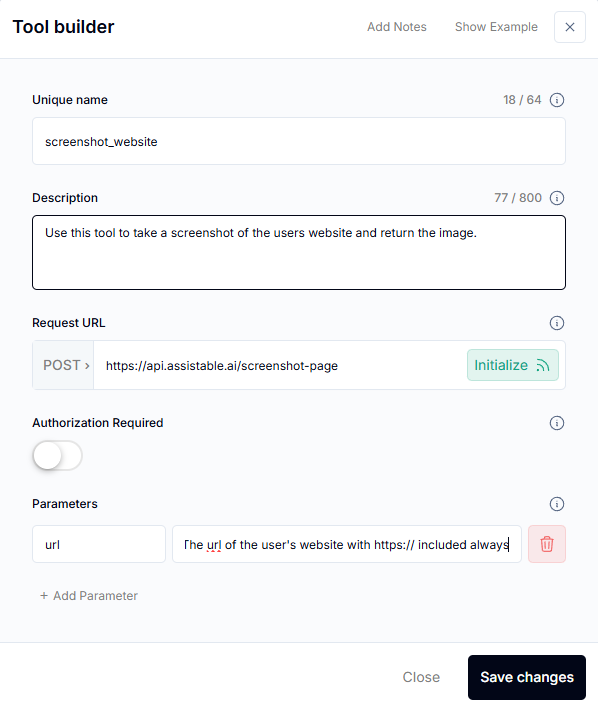
Use Cases
- Website previews — Show users what a page looks like before visiting
- Design verification — Confirm landing pages render correctly
- Documentation — Capture visual evidence of web content
- QA testing — Verify deployment changes visually
Setup
1
Create the Custom Tool
Create a new custom tool in your assistant:
- Name:
screenshot_website - Description: “Take a screenshot of the specified website URL”
- Parameters:
url(the website to screenshot)
2
Set Up a Screenshot Service
Use a screenshot API service (e.g., ScreenshotAPI, Puppeteer via Buildship) that accepts a URL and returns an image.
3
Connect and Test
Paste the service endpoint into the tool configuration, save, and test by asking your AI to screenshot a website.
Related Pages
Scrape Website
Extract text content from websites
Search the Web
Add web search to your AI
Custom Tools Overview
Custom tool fundamentals