
Overview
The Send Conversation Summary tool enables your AI assistant to capture a summary of the conversation and deliver it to your clients (or your team) via email, SMS, or any notification channel. This keeps stakeholders informed about what was discussed without manually reviewing transcripts.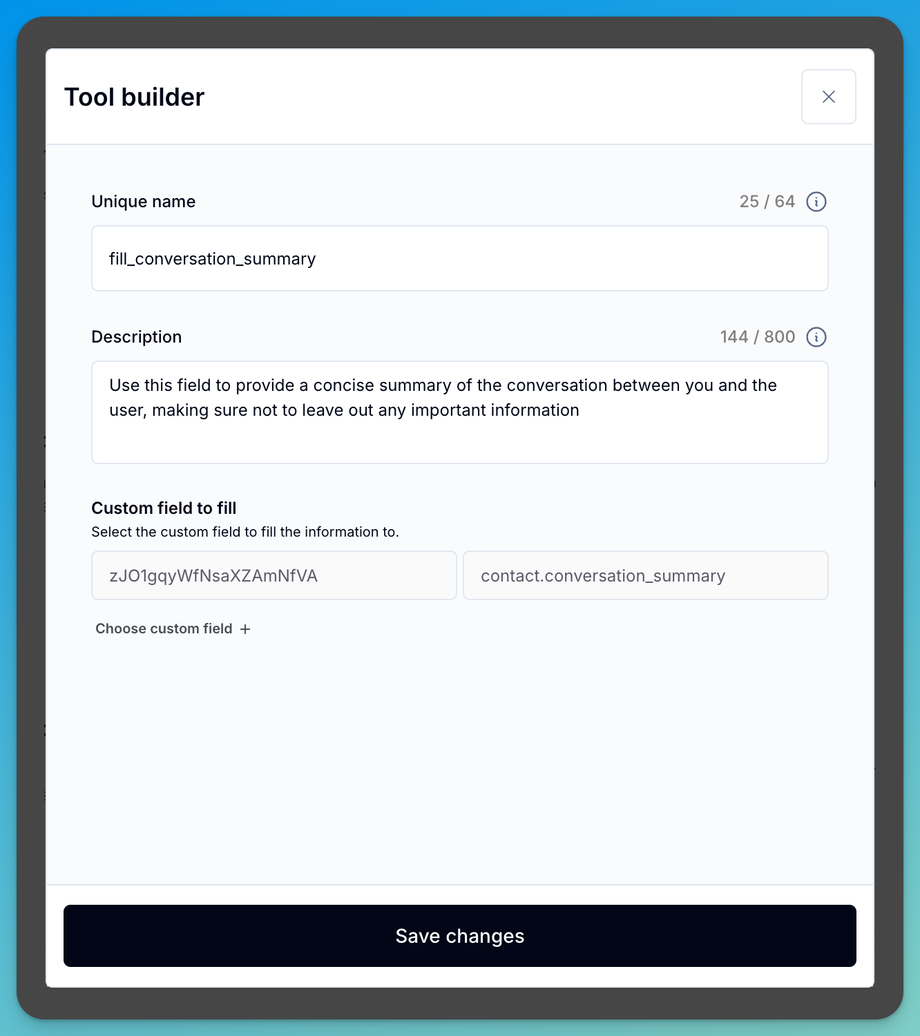
How It Works
1
Create a Custom Field in GoHighLevel
Go to Settings > Custom Fields in your GHL sub-account and create a new field called
conversation_summary (type: Multi-line Text).2
Create a Data Extraction in Assistable
In your AI assistant, set up a custom Extraction tool that automatically populates the
conversation_summary custom field with an AI-generated summary of the conversation.3
Build a GoHighLevel Workflow
Create a workflow triggered by a specific event (e.g., Appointment Booked):
- Add an SMS or Email action
- Include the custom field variable:
{{contact.conversation_summary}} - The client receives a summary of what was discussed
Example Workflow
After a booking call, your client receives:“Summary: John called about a roof inspection at 54 State St. He prefers morning appointments and has a budget of $500. Appointment booked for Tuesday 10am.”
Related Pages
Transcript Workflows
Send full conversation transcripts
Data Extraction
Extract data automatically
Auto-Populate Fields
Auto-fill custom fields
Custom Tools Overview
Custom tool fundamentals